
149 lines
8.0 KiB
Markdown
149 lines
8.0 KiB
Markdown
---
|
||
title: "networkQuality:macOS 中隐藏的网络测试工具(命令行)"
|
||
source: "https://www.sysgeek.cn/macos-networkquality/"
|
||
author:
|
||
- "[[海猴子]]"
|
||
published: 2023-12-18
|
||
created: 2025-12-02
|
||
description: "掌握 macOS 中隐藏的 networkQuality 命令,优化你的网络连接,提升连接速度。详解网络性能测试和诊断。"
|
||
tags:
|
||
- "clippings"
|
||
---
|
||

|
||
|
||

|
||
|
||
这里,我们有一个有趣而强大的工具,即 macOS 12 Monterey 及其更新版本中引入的 `networkQuality` 命令。它被用于评估网络质量和诊断潜在的网络问题,主要关注上传下载速度以及网络的响应能力。
|
||
|
||
## 运行默认测试
|
||
|
||
如果你想利用 Network Quality 工具进行测试,只需打开 macOS 中的「终端」应用程序并输入以下命令:
|
||
|
||
** 复制 ** 复制 ** 复制 ** 复制 ** 复制 ** 复制
|
||
|
||
** 复制
|
||
```
|
||
networkQuality -v
|
||
```
|
||
|
||
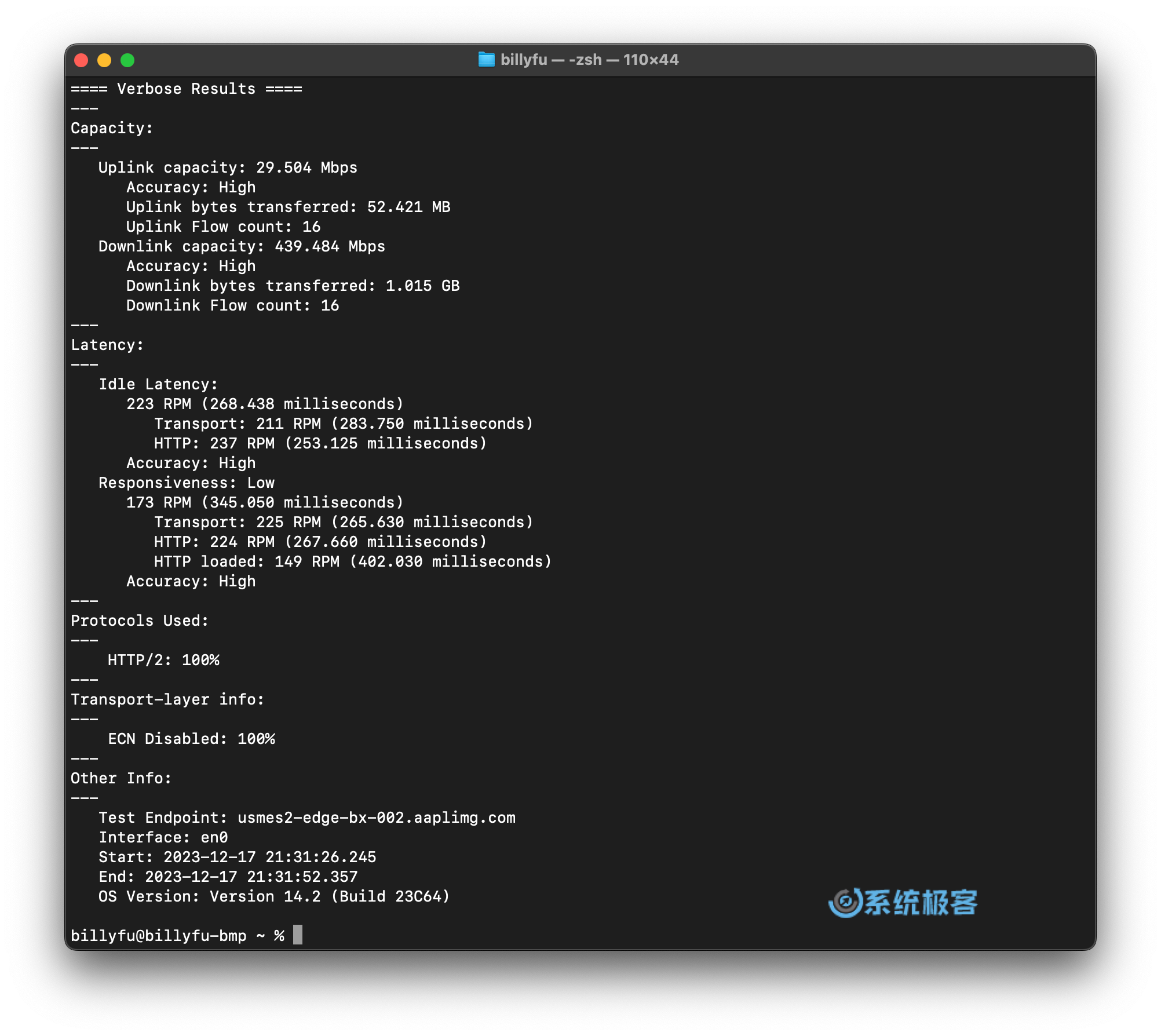
执行此命令将触发一系列默认测试,并将结果直观地展示在「终端」窗口中。
|
||
|
||
|
||
|
||
networkQuality 测试结果
|
||
|
||
| 指标 | 单位 | 说明 |
|
||
| --- | --- | --- |
|
||
| Plink capacity | Mbps | 上行速度 |
|
||
| Downlink capacity | Mbps | 下行速度 |
|
||
| Uplink bytes transferred | 字节 | 上行传输的字节数 |
|
||
| Downlink bytes transferred | 字节 | 下行传输的字节数 |
|
||
| Uplink Flow count | 次 | 上行流量计数 |
|
||
| Downlink Flow count | 次 | 下行流量计数 |
|
||
| Idle Latency | 毫秒 | 空闲延迟 |
|
||
| Responsiveness | RPM | 响应数 |
|
||
|
||
RPM 表示每分钟往返次数。响应数越高,表示网络的响应能力越好。
|
||
|
||
## Private Relay 测试
|
||
|
||
除了基本功能外,Network Quality 工具还为 Apple 的 Private Relay 提供支持。Private Relay 是一项功能强大的服务,通过两个独立的服务器对所有网络流量进行加密和路由,以提供额外的隐私和安全性。要在工具中启用 Private Relay,只需在命令中添加 `-p` 开关:
|
||
|
||
** 复制 ** 复制 ** 复制 ** 复制 ** 复制
|
||
|
||
** 复制
|
||
```
|
||
networkQuality -v -p
|
||
```
|
||
|
||
## 自定义配置
|
||
|
||
为了满足个性化需求,你可以根据具体情况自定义 Network Quality 工具的配置。默认情况下,工具通过 `https://mensura.cdn-apple.com/api/v1/gm/config` 从 Apple 获取配置文件。但你可以通过使用 `-C` 参数指定不同的配置 URL 来进行自定义。
|
||
|
||
Apple 的默认配置如下:
|
||
|
||
** 复制 ** 复制 ** 复制 ** 复制
|
||
|
||
** 复制
|
||
```
|
||
{ "version": 1,
|
||
"test_endpoint": "hkhkg3-edge-bx-014.aaplimg.com",
|
||
"urls": {
|
||
"small_https_download_url": "https://mensura.cdn-apple.com/api/v1/gm/small",
|
||
"large_https_download_url": "https://mensura.cdn-apple.com/api/v1/gm/large",
|
||
"https_upload_url": "https://mensura.cdn-apple.com/api/v1/gm/slurp",
|
||
"small_download_url": "https://mensura.cdn-apple.com/api/v1/gm/small",
|
||
"large_download_url": "https://mensura.cdn-apple.com/api/v1/gm/large",
|
||
"upload_url": "https://mensura.cdn-apple.com/api/v1/gm/slurp"
|
||
}
|
||
}
|
||
```
|
||
|
||
需要注意的是,Apple 的 `test_endpoint` 在请求时可能会变更,会选择一个就近的(不同)服务器,从而减少延迟并分散服务器负载。
|
||
|
||
比如,如果你有一个位于 `https://networkquality.example.com/config` 的自定义配置文件,可以通过以下命令运行 Network Quality 工具,来使用自定义配置:
|
||
|
||
** 复制 ** 复制 ** 复制
|
||
|
||
** 复制
|
||
```
|
||
networkQuality -v -C https://networkquality.example.com/config
|
||
```
|
||
|
||
通过这个命令,工具将按照自定义配置文件中指定的设置执行测试。要为 Network Quality 工具建立自己的测试服务器,可以在项目的 [GitHub 页面](https://github.com/network-quality/goserver) 上找到详细的文档。
|
||
|
||
## networkQuality 命令参数
|
||
|
||
** 复制 ** 复制
|
||
|
||
** 复制
|
||
```
|
||
USAGE: networkQuality [-C <configuration_url>] [-c] [-d] [-f <comma-separated list>] [-h] [-I <network interface name>] [-k] [-p] [-r host] [-S <port>] [-s] [-u] [-v]
|
||
-C: Override Configuration URL or path (with scheme file://)
|
||
-c: Produce computer-readable output
|
||
-d: Do not run a download test (implies -s)
|
||
-f: <comma-separated list>: Enforce Protocol selections. Available options:
|
||
h1: Force-enable HTTP/1.1
|
||
h2: Force-enable HTTP/2
|
||
h3: Force-enable HTTP/3 (QUIC)
|
||
L4S: Force-enable L4S
|
||
noL4S: Force-disable L4S
|
||
-h: Show help (this message)
|
||
-I: Bind test to interface (e.g., en0, pdp_ip0,...)
|
||
-k: Disable certificate validation
|
||
-p: Use iCloud Private Relay
|
||
-r: Connect to host or IP, overriding DNS for initial config request
|
||
-S: Start and run server on specified port. Other specified options ignored
|
||
-s: Run tests sequentially instead of parallel upload/download
|
||
-u: Do not run an upload test (implies -s)
|
||
-v: Verbose output
|
||
```
|
||
|
||
---
|
||
|
||
macOS 中的 `networkQuality` 工具是一款强大的命令行实用程序,专注于测量网络连接性能。它不仅可以用于常规网络测试,还支持通过 Apple Private Relay 进行测试而无需购买 iCloud+ 服务,这是一个很方便的功能。
|
||
|
||
相关资源:
|
||
|
||
- [networkQuality Wiki](https://github.com/network-quality/community/wiki)
|
||
- [PPM 响应性草案 RFC](https://www.ietf.org/archive/id/draft-cpaasch-ippm-responsiveness-00.html)
|
||
|
||
[** 赞(1)](https://www.sysgeek.cn/macos-networkquality/)
|
||
|
||
分享到 [**](https://www.sysgeek.cn/macos-networkquality/ "分享到微信") **
|
||
|
||
### 相关推荐
|
||
|
||
- [](https://www.sysgeek.cn/macos-tahoe-26-1/) [macOS Tahoe 26.1 发布:新增「液态玻璃」色调模式](https://www.sysgeek.cn/macos-tahoe-26-1/)
|
||
- [](https://www.sysgeek.cn/macos-tahoe-26-0-1/) [macOS Tahoe 26.0.1 发布,修复 M3 Ultra 无法安装的问题](https://www.sysgeek.cn/macos-tahoe-26-0-1/)
|
||
- [](https://www.sysgeek.cn/macos-tahoe-26-new-settings/) [10+ macOS Tahoe 26 全新设置,值得你的关注与调校](https://www.sysgeek.cn/macos-tahoe-26-new-settings/)
|
||
- [](https://www.sysgeek.cn/macos-sequoia-15-6-1/) [macOS Sequoia 15.6.1 发布,修复已被利用的高危漏洞](https://www.sysgeek.cn/macos-sequoia-15-6-1/)
|
||
- [](https://www.sysgeek.cn/macos-sequoia-15-6/) [macOS Sequoia 15.6 发布,修复 81 项安全问题](https://www.sysgeek.cn/macos-sequoia-15-6/)
|
||
- [](https://www.sysgeek.cn/apple-container/) [Apple Container:苹果容器化框架简介](https://www.sysgeek.cn/apple-container/)
|
||
- [](https://www.sysgeek.cn/macos-tahoe-wallpaper/) [macOS 26 Tahoe 桌面壁纸下载(4K/6K 高清官方壁纸)](https://www.sysgeek.cn/macos-tahoe-wallpaper/)
|
||
- [](https://www.sysgeek.cn/ios-26-ipados-26-macos-26-compatibility-list/) [iOS、iPadOS 和 macOS 26 支持机型列表:哪些设备可以升级?](https://www.sysgeek.cn/ios-26-ipados-26-macos-26-compatibility-list/)
|
||
|
||
- [首页](https://www.sysgeek.cn/)
|
||
- [新闻](https://www.sysgeek.cn/news/)
|
||
- [macOS](https://www.sysgeek.cn/macos/)
|
||
- [专题](https://www.sysgeek.cn/topic/) |