
329 lines
17 KiB
Markdown
329 lines
17 KiB
Markdown

|
||
|
||
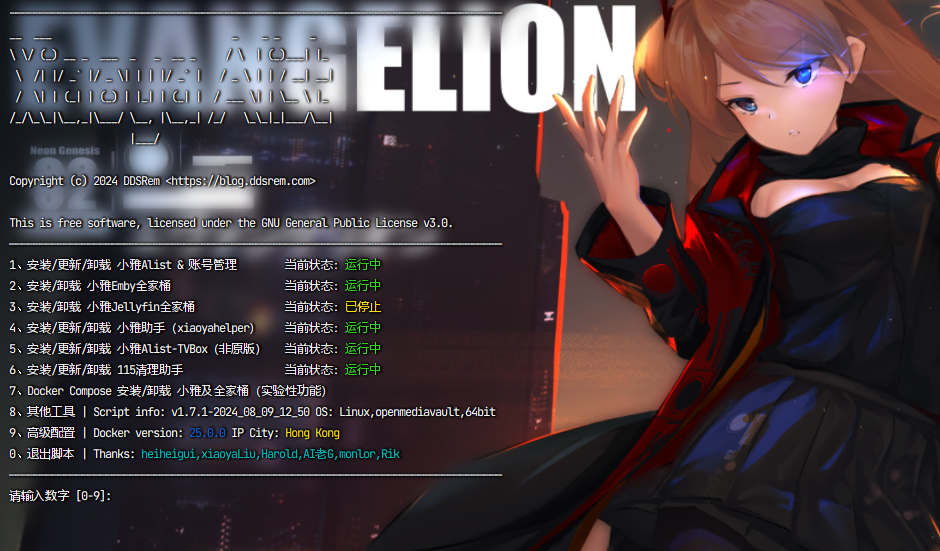
|
||
|
||

|
||
|
||
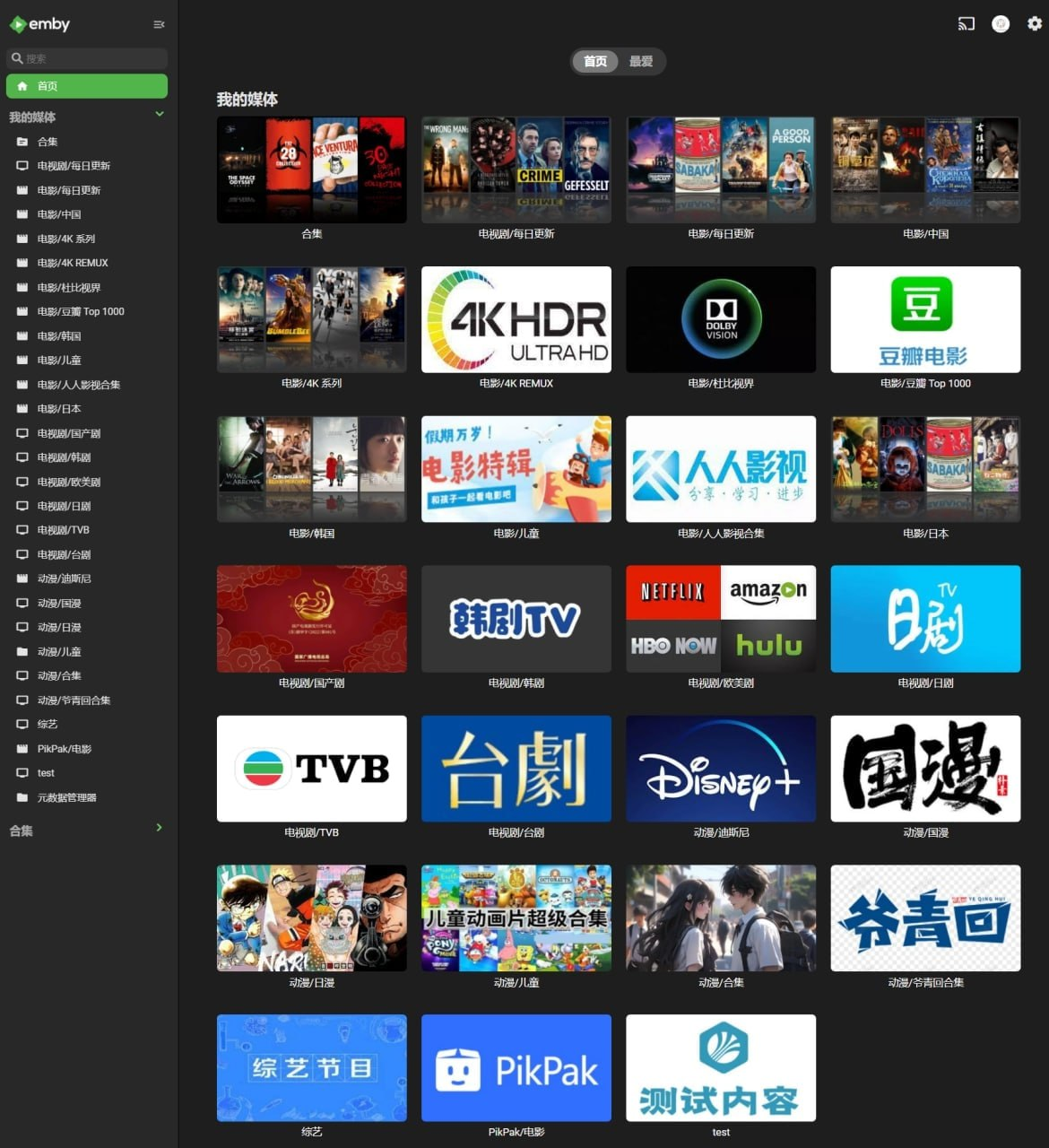
|
||
|
||

|
||
|
||
- [main.sh](#mainsh)
|
||
- [使用](#使用)
|
||
- [功能列表](#功能列表)
|
||
- [相关地址](#相关地址)
|
||
- [通用兼容性测试报告](#通用兼容性测试报告)
|
||
- [Star History](#star-history)
|
||
- [小雅周边工具集合](#小雅周边工具集合)
|
||
- [感谢](#感谢)
|
||
- [捐赠](#捐赠)
|
||
- [许可证](#许可证)
|
||
- [附加条款](#附加条款)
|
||
- [免责声明](#免责声明)
|
||
|
||
## main.sh
|
||
|
||
> [!NOTE]
|
||
> 整合安装脚本,内置所有相关软件的安装。
|
||
|
||
### 使用
|
||
|
||
```shell
|
||
bash -c "$(curl --insecure -fsSL https://ddsrem.com/xiaoya_install.sh)"
|
||
```
|
||
|
||
**备用地址**
|
||
|
||
```shell
|
||
bash <(curl --insecure -fsSL https://ddsrem.com/xiaoya/all_in_one.sh)
|
||
```
|
||
|
||
```shell
|
||
bash <(curl --insecure -fsSL https://fastly.jsdelivr.net/gh/xiaoyaDev/xiaoya-alist@latest/all_in_one.sh)
|
||
```
|
||
|
||
```shell
|
||
bash <(curl --insecure -fsSL https://raw.githubusercontent.com/xiaoyaDev/xiaoya-alist/master/all_in_one.sh)
|
||
```
|
||
|
||
```shell
|
||
bash -c "$(curl --insecure -fsSL https://fastly.jsdelivr.net/gh/xiaoyaDev/xiaoya-alist@latest/main.sh)"
|
||
```
|
||
|
||
```shell
|
||
bash -c "$(curl --insecure -fsSL https://raw.githubusercontent.com/xiaoyaDev/xiaoya-alist/master/main.sh)"
|
||
```
|
||
|
||
### 功能列表
|
||
|
||
> [!NOTE]
|
||
> 数字代表先选x,再选x,再选x
|
||
>
|
||
> PS: 2 2 8代表先选2,再选2,最后选8
|
||
|
||
**普通功能**
|
||
|
||
```shell
|
||
———————————————————————————————————————安装———————————————————————————————————————
|
||
安装 小雅Alist -> 1 1
|
||
安装 Emby全家桶(一键) -> 2 1
|
||
安装 小雅元数据定时爬虫 -> 2 5 1
|
||
安装 小雅元数据爬虫(Web 版本)-> 2 6 1
|
||
安装/更新 小雅助手(xiaoyahelper)-> 3 1
|
||
安装 115清理助手 -> 4 1
|
||
安装 Portainer -> 5 1 1
|
||
安装 Auto_Symlink -> 5 2 1
|
||
安装 Onelist -> 5 3 1
|
||
安装 Xiaoya Proxy -> 5 4 1
|
||
安装 Xiaoya aliyuntvtoken_connector -> 5 5 1
|
||
安装 小雅Alist-TVBox -> 5 6 1
|
||
安装 LrcAPI -> 5 7 1
|
||
安装 CasaOS -> 5 8 1
|
||
——————————————————————————————Emby手动全家桶配置————————————————————————————————————
|
||
单独 下载并解压 全部元数据 -> 2 2 1
|
||
单独 解压 全部元数据 -> 2 2 2
|
||
单独 下载 all.mp4 -> 2 2 3
|
||
单独 解压 all.mp4 -> 2 2 4
|
||
解压 all.mp4 的指定元数据目录【非全部解压】-> 2 2 5
|
||
单独 下载 config.mp4 -> 2 2 6
|
||
单独 解压 config.mp4 -> 2 2 7
|
||
单独 下载 pikpak.mp4 -> 2 2 8
|
||
单独 解压 pikpak.mp4 -> 2 2 9
|
||
单独 下载 115.mp4 -> 2 2 10
|
||
单独 解压 115.mp4 -> 2 2 11
|
||
解压 115.mp4 的指定元数据目录【非全部解压】-> 2 2 12
|
||
单独 下载 蓝光原盘.mp4 -> 2 2 13
|
||
单独 解压 蓝光原盘.mp4 -> 2 2 14
|
||
单独 下载 json.mp4 -> 2 2 15
|
||
单独 解压 json.mp4 -> 2 2 16
|
||
单独 下载 music.mp4 -> 2 2 17
|
||
单独 解压 music.mp4 -> 2 2 18
|
||
单独 下载 短剧.mp4 -> 2 2 19
|
||
单独 解压 短剧.mp4 -> 2 2 20
|
||
选择 下载器【aria2/wget】-> 2 2 21
|
||
单独 安装Emby(可选择版本,支持官方,amilys,lovechen)-> 2 3
|
||
图形化编辑 emby_config.txt -> 2 4
|
||
小雅爬虫 立刻爬取指定目录 -> 2 5 4
|
||
小雅爬虫 容器定时爬取目录单独配置 -> 2 5 5
|
||
小雅爬虫 清理爬虫进程锁 -> 2 5 6
|
||
小雅爬虫 重置爬虫数据库 -> 2 5 7
|
||
一键升级Emby容器(可选择镜像版本) -> 2 7
|
||
开启/关闭 解压成功后自动清理 mp4 元数据文件 -> 2 9 1 1
|
||
一键清理当前所有 mp4 元数据文件 -> 2 9 1 2
|
||
关闭 Emby 6908 端口访问 -> 2 9 2
|
||
———————————————————————————————————————更新———————————————————————————————————————
|
||
更新 小雅Alist -> 1 2
|
||
更新 小雅元数据定时爬虫 -> 2 5 2
|
||
更新 小雅元数据爬虫(Web 版本)-> 2 6 2
|
||
更新 115清理助手 -> 4 2
|
||
更新 Portainer -> 5 1 2
|
||
更新 Auto_Symlink -> 5 2 2
|
||
更新 Onelist -> 5 3 2
|
||
更新 Xiaoya Proxy -> 5 4 2
|
||
更新 Xiaoya aliyuntvtoken_connector -> 5 5 2
|
||
更新 小雅Alist-TVBox -> 5 6 2
|
||
更新 LrcAPI -> 5 7 2
|
||
———————————————————————————————————————卸载———————————————————————————————————————
|
||
卸载 小雅Alist -> 1 3
|
||
卸载 小雅元数据定时爬虫 -> 2 5 3
|
||
卸载 小雅元数据爬虫(Web 版本)-> 2 6 3
|
||
卸载 Emby全家桶 -> 2 8
|
||
卸载 小雅助手(xiaoyahelper)-> 3 3
|
||
卸载 115清理助手 -> 4 3
|
||
卸载 Portainer -> 5 1 3
|
||
卸载 Auto_Symlink -> 5 2 3
|
||
卸载 Onelist -> 5 3 3
|
||
卸载 Xiaoya Proxy -> 5 4 3
|
||
卸载 Xiaoya aliyuntvtoken_connector -> 5 5 3
|
||
卸载 小雅Alist-TVBox -> 5 6 3
|
||
卸载 LrcAPI -> 5 7 3
|
||
卸载 CasaOS -> 5 9 2
|
||
——————————————————————————————————————系统工具——————————————————————————————————————
|
||
查看系统磁盘挂载 -> 5 8
|
||
———————————————————————————————————————其他———————————————————————————————————————
|
||
一次性运行 小雅助手(xiaoyahelper)-> 3 2
|
||
账号管理 -> 1 4
|
||
非内网IP访问次数查看 -> 1 5
|
||
```
|
||
|
||
**高级功能**
|
||
|
||
```shell
|
||
Docker启动容器名称设置 -> 6 1
|
||
是否开启容器运行额外参数添加 -> 6 2
|
||
重置脚本配置 -> 6 3
|
||
开启/关闭 磁盘容量检测 -> 6 4
|
||
开启/关闭 小雅连通性检测 -> 6 5
|
||
Docker镜像源选择 -> 6 6
|
||
非可选网络模式容器默认网络模式 -> 6 7
|
||
进入弃用菜单 -> 6 8
|
||
开启/关闭 使用宿主机7z命令解压 -> 6 9
|
||
```
|
||
|
||
**弃用菜单(此菜单下的功能不再维护,不建议使用)**
|
||
|
||
```shell
|
||
———————————————————————————————————————安装———————————————————————————————————————
|
||
安装 Jellyfin全家桶(一键) -> 6 8 3 1
|
||
安装 Resilio-Sync(单独) -> 6 8 2 2 1
|
||
——————————————————————————————Emby手动全家桶配置————————————————————————————————————
|
||
立即 同步小雅Emby的config目录 -> 6 8 2 3
|
||
单独 创建/删除 同步定时更新任务 -> 6 8 2 4
|
||
————————————————————————————Jellyfin手动全家桶配置——————————————————————————————————
|
||
|
||
注意:目前官方 Jellyfin 安装方案已经长久未维护!
|
||
如果您需要安装 小雅Jellyfin 全家桶,请使用 AI老G 的脚本安装,风险自担。
|
||
脚本命令:bash <(curl -sSLf https://xy.ggbond.org/xy/xy_install.sh)
|
||
|
||
单独 下载并解压 全部元数据 -> 6 8 3 2 1
|
||
单独 解压 全部元数据 -> 6 8 3 2 2
|
||
单独 下载 all_jf.mp4 -> 6 8 3 2 3
|
||
单独 解压 all_jf.mp4 -> 6 8 3 2 4
|
||
解压 all_jf.mp4 的指定元数据目录【非全部解压】-> 6 8 3 2 5
|
||
单独 下载 config_jf.mp4 -> 6 8 3 2 6
|
||
单独 解压 config_jf.mp4 -> 6 8 3 2 7
|
||
单独 下载 PikPak_jf.mp4 -> 6 8 3 2 8
|
||
单独 解压 PikPak_jf.mp4 -> 6 8 3 2 9
|
||
选择 下载器【aria2/wget】-> 6 8 3 2 10
|
||
单独 安装Jellyfin-> 6 8 3 3
|
||
———————————————————————————————————————更新———————————————————————————————————————
|
||
更新 Resilio-Sync(单独) -> 6 8 2 2 2
|
||
———————————————————————————————————————卸载———————————————————————————————————————
|
||
卸载 卸载Jellyfin全家桶 -> 6 8 3 4
|
||
卸载 Resilio-Sync(单独) -> 6 8 2 2 3
|
||
———————————————————————————————————————其他———————————————————————————————————————
|
||
创建/删除 定时同步更新数据(小雅alist启动时拉取的数据)-> 6 8 1 1
|
||
```
|
||
|
||
## 相关地址
|
||
|
||
- [https://github.com/xiaoyaDev/xiaoya-alist](https://github.com/xiaoyaDev/xiaoya-alist)
|
||
- [https://hub.docker.com/r/ddsderek/xiaoya-emd](https://hub.docker.com/r/ddsderek/xiaoya-emd)
|
||
- [https://hub.docker.com/r/ddsderek/xiaoya-proxy](https://hub.docker.com/r/ddsderek/xiaoya-proxy)
|
||
- [https://hub.docker.com/r/ddsderek/xiaoya-cron](https://hub.docker.com/r/ddsderek/xiaoya-cron)
|
||
- [https://hub.docker.com/r/ddsderek/xiaoya-glue](https://hub.docker.com/r/ddsderek/xiaoya-glue)
|
||
- [https://hub.docker.com/r/ddsderek/xiaoya-115cleaner](https://hub.docker.com/r/ddsderek/xiaoya-115cleaner)
|
||
- [https://gitee.com/ddsrem/xiaoya-alist-base](https://gitee.com/ddsrem/xiaoya-alist-base)
|
||
- 小雅官方 [Telegram](https://t.me/xiaoyaliu00) 交流群
|
||
|
||
## 通用兼容性测试报告
|
||
|
||
> [!NOTE]
|
||
> ✅代表测试通过且兼容;❌代表不兼容;🚧代表未经过充分测试兼容性不确定!
|
||
|
||
| 软件名称 | x86-64 \| amd64 | arm64 \| arm64v8 | armhf \| armv7 |
|
||
| :------------------------------: | :--------------: | :---------------: | :-------------: |
|
||
| 小雅Alist | ✅ | ✅ | ✅ |
|
||
| 小雅Emby全家桶 | ✅ | ✅ | ❌ |
|
||
| 小雅Jellyfin全家桶 | ✅ | ✅ | ❌ |
|
||
| 小雅助手(xiaoyahelper) | ✅ | ✅ | ✅ |
|
||
| 小雅Alist-TVBox | ✅ | ✅ | ❌ |
|
||
| Onelist | ✅ | ✅ | ✅ |
|
||
| 小雅元数据爬虫(xiaoya-emd) | ✅ | ✅ | ✅ |
|
||
| 小雅元数据爬虫(Web 版本) | ✅ | ✅ | ✅ |
|
||
| 小雅Cron容器(xiaoya-cron) | ✅ | ✅ | ✅ |
|
||
| 小雅代理容器(xiaoya-proxy) | ✅ | ✅ | ✅ |
|
||
| 115清理助手(xiaoya-115cleaner) | ✅ | ✅ | ✅ |
|
||
| xiaoya-glue(官方 python) | ✅ | ✅ | ❌ |
|
||
| xiaoya-glue(官方 latest) | ✅ | ✅ | ✅ |
|
||
| xiaoya-glue(DDSRem python) | ✅ | ✅ | ❌ |
|
||
| xiaoya-glue(DDSRem aliyuntvtoken_connector) | ✅ | ✅ | ✅ |
|
||
|
||
| 系统名称 | all_in_one.sh | emby_config_editor.sh | xiaoya_notify.sh(已弃用) |
|
||
| :-------------: | :-----: | :-------------------: | :-------------: |
|
||
| CentOS 7.9 | ✅ | ✅ | ✅ |
|
||
| CentOS 8.4 | ✅ | ✅ | ✅ |
|
||
| CentOS 8 Stream | ✅ | ✅ | ✅ |
|
||
| CentOS 9 Stream | ✅ | ✅ | ✅ |
|
||
| Debian 10.3 | ✅ | ✅ | ✅ |
|
||
| Debian 11.3 | ✅ | ✅ | ✅ |
|
||
| Debian 12.0 | ✅ | ✅ | ✅ |
|
||
| Ubuntu 18.04 | ✅ | ✅ | ✅ |
|
||
| Ubuntu 20.04 | ✅ | ✅ | ✅ |
|
||
| Ubuntu 22.04 | ✅ | ✅ | ✅ |
|
||
| Ubuntu 22.10 | ✅ | ✅ | ✅ |
|
||
| Ubuntu 23.04 | ✅ | ✅ | ✅ |
|
||
| Fedora 31 | ✅ | ✅ | ✅ |
|
||
| Fedora 32 | ✅ | ✅ | ✅ |
|
||
| Fedora 36-38 | ✅ | ✅ | ✅ |
|
||
| Fedora 40 | ✅ | ✅ | ✅ |
|
||
| Fedora 41 | ✅ | ✅ | ✅ |
|
||
| Fedora 42 | ✅ | ✅ | ✅ |
|
||
| AlmaLinux 9 | ✅ | ✅ | ✅ |
|
||
| RockyLinux 8.6 | ✅ | ✅ | ✅ |
|
||
| Arch Linux | ✅ | ✅ | ✅ |
|
||
| openSUSE 15.4 | ✅ | ✅ | ✅ |
|
||
| FreeBSD | ✅ | ✅ | ✅ |
|
||
| EulerOS | ✅ | ✅ | ✅ |
|
||
| Amazon Linux | ✅ | ✅ | ✅ |
|
||
| Alpine | ✅ | ✅ | ✅ |
|
||
| MacOS | ✅ | ✅ | 🚧 |
|
||
| UnRaid | ✅ | ✅ | ✅ |
|
||
| OpenMediaVault | ✅ | ✅ | ✅ |
|
||
| QNAP(威联通) | ✅ | ✅ | ✅ |
|
||
| OpenWRT | ✅ | ✅ | ✅ |
|
||
| Synology(群晖) | ✅ | ✅ | ✅ |
|
||
| TrueNAS CORE | 🚧 | 🚧 | 🚧 |
|
||
| TrueNAS SCALE | 🚧 | 🚧 | 🚧 |
|
||
| UGOS(绿联云) | ✅ | ✅ | ✅ |
|
||
| UGOS Pro(绿联云 Pro) | ✅ | ✅ | ✅ |
|
||
| LibreELEC | ❌ | ❌ | ❌ |
|
||
| Windows WSL Docker | 🚧 | 🚧 | ❌ |
|
||
| ZSpace(极空间) | 🚧 | 🚧 | 🚧 |
|
||
| fnOS (飞牛私有云) | ✅ | ✅ | ✅ |
|
||
|
||
## Star History
|
||
|
||
[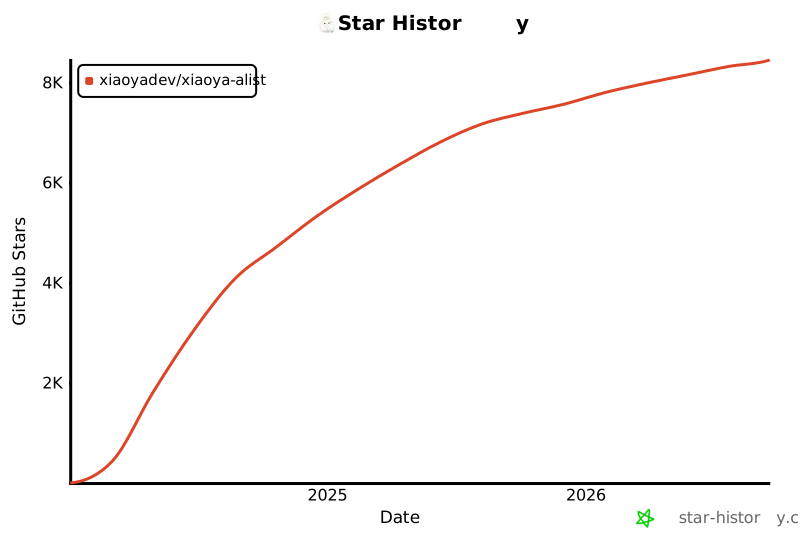](https://star-history.com/#xiaoyaDev/xiaoya-alist)
|
||
|
||
## 小雅周边工具集合
|
||
|
||
- [AI老G 脚本推荐](https://b23.tv/3Zo0IvD)
|
||
- 小雅全家桶安装脚本(支持AI老G版小雅Alist安装,Jellyfin安装,快速Emby安装):
|
||
```shell
|
||
bash <(curl -sSLf https://xy.ggbond.org/xy/xy_install.sh)
|
||
```
|
||
- TG 群组:https://t.me/ailg666
|
||
- [Xiaoya-convert](https://github.com/ypq123456789/xiaoya-convert): 自动批量将阿里云盘分享链接转换为小雅`alishare_list.txt`中的格式
|
||
- [Xiaoyahelper](https://github.com/xiaoyaDev/xiaoyahelper): 一劳永逸的小雅转存清理工具
|
||
- [Alist-TVBox](https://hub.docker.com/r/haroldli/alist-tvbox): 一个基于`AList`和`xiaoya`的`TVBox`管理工具
|
||
- [`strm`文件生成](https://xiaoyaliu.notion.site/strm-2c8d136ceb37445fb6c0222eafb966ce): 小雅官方提供的一键生成`strm`文件脚本
|
||
- [monlor/docker-xiaoya](https://github.com/monlor/docker-xiaoya): Docker Compose 方式一键部署小雅全家桶
|
||
- [xiaoya-sync](https://github.com/xiaoyaDev/xiaoya-sync): Java 编写的小雅元数据爬虫
|
||
- [sjtuross/StrmAssistant](https://github.com/sjtuross/StrmAssistant): Strm Assistant for Emby
|
||
- [suixing8/xiaoya-alist-search](https://github.com/suixing8/xiaoya-alist-search): 不安装Emby的情况下,在iOS Fileball上使用全局搜索和直接观看
|
||
|
||
## 感谢
|
||
|
||
- [xiaoyaLiu](http://alist.xiaoya.pro/)
|
||
- [heiheigui](https://xiaoyahelper.zengge99.eu.org/aliyun_clear.sh)
|
||
- [alist-tvbox](https://github.com/power721/alist-tvbox)
|
||
- [Auto_Symlink](https://github.com/shenxianmq/Auto_Symlink)
|
||
- [Portainer](https://github.com/portainer/portainer)
|
||
- [AI老G](https://space.bilibili.com/252166818)
|
||
- [monlor](https://link.monlor.com)
|
||
- [Rik](https://github.com/Rik-F5)
|
||
|
||
<a href="https://github.com/xiaoyaDev/xiaoya-alist/graphs/contributors"><img src="https://contrib.rocks/image?repo=xiaoyaDev/xiaoya-alist"></a>
|
||
|
||
## 捐赠
|
||
|
||
- [捐赠项目作者DDSRem](https://raw.githubusercontent.com/xiaoyaDev/xiaoya-alist/master/assets/appreciate-ddsrem.png)
|
||
- [捐赠小雅](https://raw.githubusercontent.com/xiaoyaDev/xiaoya-alist/master/assets/appreciate-xiaoya.png)
|
||
- [捐赠AI老G](https://raw.githubusercontent.com/xiaoyaDev/xiaoya-alist/master/assets/appreciate-ailaog.png)
|
||
|
||
## 许可证
|
||
|
||
此项目根据 GNU General Public License v3.0 许可证进行许可,详见[`LICENSE`](LICENSE) 文件。
|
||
|
||
### 附加条款
|
||
|
||
- 请勿将 小雅系列软件 用于商业用途。
|
||
- 请勿将 小雅系列软件 用于任何违反法律法规的行为。
|
||
- 本仓库所有脚本均基于官方脚本制作,使用请自行承担数据损失但不限于此的风险。
|
||
- 本仓库所有脚本仅供学习交流,使用本仓库脚本进行违法操作产生的法律责任由操作者自行承担。
|
||
|
||
### 免责声明
|
||
|
||
使用此项目则意味着你接受以上规定和 GNU General Public License v3.0 许可证。
|